

A Groovy Start
Maybe, you’ve read some of great things about Groovy. You love its dynamic typing and flexibility, plus cool constructs like closures and builders. As a Java developer you especially like the way the Groovy plays in the same JVM sandbox, and allows you to drop in and out of Java as desired. But … where do you get started?
Many of us developers don’t have the luxury of deciding for ourselves to start that next work project in Groovy. It’s a great language but it may take some schmoozing of our management to convince them that we must switch over to Groovy. Also, in spite of all the great write-ups we’ve all read, we might still be somewhat skeptical ourselves. We love reading about new technologies. Groovy sounds great but we’re software developers who work in the real world, and not academicians dreaming in an Ivy tower. Groovy might look good for some small textbook examples we find on web site somewhere but how well does it work for those mission-critical apps we have to maintain?
Fortunately, Groovy has some great scripting options that allow us to easily introduce Groovy into our existing Java applications with little impact on those apps. For this series I will put together the steps needed to sprinkle some Groovy into your app.
Feelin’ Groovy … at 2am in the morning !?

One of the really nice aspects of Groovy is that you can dynamically compile and execute scripts on the fly. Where would this be useful? Well, consider being woken by a call at 2:00am. The latest release of your mission-critical app has developed a problem, and fingers are now pointing in your direction to come up with a quick fix. After shaking the sleep from your head, you ask a series of questions about the field issue. Your heart drops as you realize that you introduced a bug in some critical piece of code. Arghh …
But what to do now? Do you work furiously until dawn to fix the bug, re-build the entire application and re-deploy to the field? There is no easy way to patch bytecode. But what if your application already called a Groovy script? Maybe, the script does little or nothing presently, but you could modify this script to change the behavior of your app without re-building your app. How cool is that? You could just fire up vi on the script to add in some patch code, or direct someone else over the phone to do it for you. This is one of the many advantages that Groovy scripting brings to the table.
Plugging in Groovy
Groovy has good support in a number of IDEs. I will cover Eclipse but most of the discussion is applicable for other IDEs.
First, add in the Groovy plugin for Eclipse. See Eclipse+Plugin for details. Technically, for what we will be doing we don’t actually need the Groovy plugin unless we intend to edit Groovy scripts directly under Eclipse. Only the groovy-all.jar is needed as a external dependency jar. But it is very convenient to use the plugin as we decide more to add more Groovy to our app.
The next step is to bring up your project under Eclipse. The Groovy Plugin should already be installed.
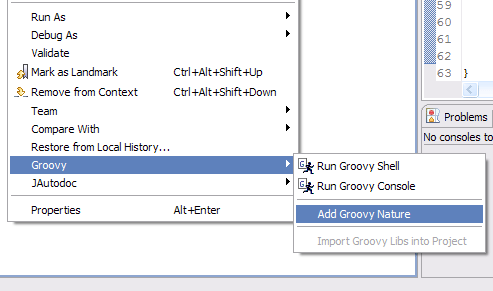
Right click on your project in the Package Explorer. Click on Groovy –>Add Groovy Nature.
Gentlemen, start your Engines

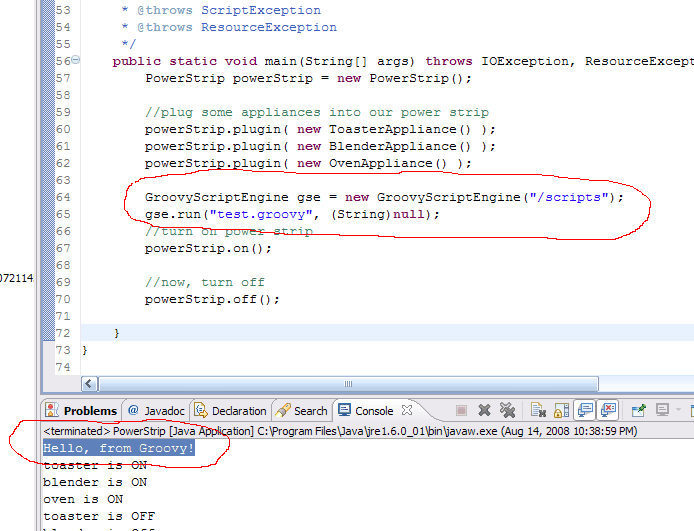
The next step is to create a GroovyScriptEngine instance() in our existing application. The GroovyScriptEngine is our main class for accessing and executing Groovy scripts. There are a number of variants of constructors. Basically, you must give the class a directory or set of directories that contain your Groovy scripts. We will have create a GroovyScriptEngine that manages scripts from a “/scripts” subdirectory:
GroovyScriptEngine gse = new GroovyScriptEngine("/scripts");

gse.run("test.groovy", (String)null);
The run method will tell the GroovyScriptEngine to locate and execute a Groovy script, called “test.groovy”, under our “/scripts” directory. The null String is an optional argument to passed in the script. Later, we’ll see more sophisticated ways of interfacing with the script via bindings.
From a commandline or shell, go ahead and create the “/scripts” directory. Fire your favorite text editor, and create our first sample Groovy script:
println "Hello, from Groovy!"
Some tough code there … but we’re just trying to under the interfaces at this point. Save your script as /scripts/test.groovy.
Seeing is Believing
Now, we’ll start up our application, and see what happens.
A Peek under the Hood
So what?, asks a skeptical voice inside your head. Why call a script from your application just to output a hello-world from an external script? I could do this directly with a System.out.println() in my application. And, besides, what is the performance penalty of compiling and executing of this script?
Good questions. To answer the first question about the usefulness of just printing a line, this is just a dumbed-down example. The real lesson to be learned here is that the script can be arbitrarily complex.
You could stick any Groovy code you want in here, and almost any Java code. This script could fire off queries to a database, open a gazzillion IP connections, or make you irresistible to members of the opposite sex. Ok … maybe not the latter 🙂 But the script can literally do anything your application itself can do. The flexibility of Groovy also helps a lot here. Groovy allows you to include multiple Java class definitions in the same script. You could define a dozen classes, instantiate them, start threads, and do basically anything in one Groovy script that you otherwise would need to distribute among dozens of .java source files if you worked strictly in Java. The one important feature that you will need for any serious scripting from your application is bindings; but I will cover that next.
For the second question about performance, you may be pleasantly surprised. The GroovyScriptEngine does compile the Groovy script initially. There is some certainly some overhead associated with the compilation but the GroovyScriptEngine is smart enough not to re-compile the script unless the script has actual changed. Consider: if we modified our above example, to call gse.run() repeated in a loop:
for( ; ; ) {

    gse.run("test.groovy", (String)null);

    Thread.sleep(1000);

}
On the first iteration of the loop, the GroovyScriptEngine will determine that “test.groovy” needs to be compiled. But once the script is compiled into bytecode, it executes in the same JVM as your application very much like making a just another method call. On a subsequent iteration of the loop, the GroovyScriptEngine will just examine the timestamp of the groovy script. If the script has not changed, the bytecode from the script is directly executed. We have nothing like the overhead of spawning a separate process to run a shell or perl script. Everything is done locally in the same JVM.
Luke, Use the (Scripting) source …
The only additional overhead at this point, will be small amount of I/O to check the timestamp. There are options to avoid this that will be discussed in a later article; but this default feature of re-compiling the groovy script is exactly the behavior we want if we go back to our scenario of the dreaded 2am support call.
In that 2am scenario, we want to somehow change the behavior of a running application in the field. The GroovyScriptEngine provides the solution for us. We just have gse.run() calls at strategic points in our application. These gse.run() will likely run empty or very minimal scripts. When we want to change the behavior of our application, we simply drop in a replacement script. Of course, only you will know the details of what needs to change or where these scripting points should be located; but the important take-away here is that you do not have to shutdown your application. No new deployment of your application. No separate compilations. No shutdowns. No startups. Nada. The GroovyScriptEngine simply picks up a newer script automagically, and works it Groovy magic on your application.
Bound for Glory
I have referenced Bindings several times earlier. This is probably a familiar concept to many of you. A Binding is an interface that allow your script to access objects in your application. This would allow a script to access data members of objects in your app, or to call methods or setters to change data or tweak application behavior.
To use a Binding, we just create an instance:
Binding binding = new Binding();
Next, we add a ‘variable’ to our binding. A variable is just String identifier with an associated value:
binding.setVariable("myCoolVariable", myCoolVariableObject);
You can add as many variables as you want. A variant of the GroovyScriptEngine run method() takes a Binding as the second argument (rather than the (String)null one we had been using before):
MyCoolVariable myCoolVariable = myCoolVariableObject;

Binding binding = new Binding();

binding.setVariable("myCoolVariable", myCoolVariable);

gse.run("test.groovy", binding);
The GroovyScriptEngine, when passed a binding, will work some magic behind the scenes to transform the variables in the binding into field variables (with the same name and types) in the script. For the example above, the GroovyScriptEngine would create Java code behind the scenes that would add something like this:
MyCoolVariable myCoolVariable = myCoolVariableObject;
This means the Binding itself is transparent to the script itself. The script can access these variables as if the were fields directly defined within the script. How cool is that?
Since the bindings themselves are compiled into the application rather than scriptable, we unfortunately can’t add or change bindings at runtime. Instead, the strategy we might use is to add all essential application objects as variables in the binding whether used currently by the script or not. There is no harm in passing extra unused variables to a script. But if we need to introduce a script at 2am that requires a variable not currently being passed in a binding, we are stuck. (Since the script is running in the same JVM we could use reflection from the script to get a reference to an application object not being passed, but this is a very ugly solution). The best approach would be to think ahead, and include all variables that a script might reasonably use.
Let’s cut through the verbiage, and see something in action. Our original application was some sample code I had laying around that implemented a conceptual ‘powerstrip’ to demonstrate a design pattern. The details of this application aren’t important, just the fact that there is a powerStrip object in the application that we can manipulate in our script. I will pass this powerStrip object to our test.groovy script as a variable called … wait for it …. ‘powerStrip’:
GroovyScriptEngine gse = new GroovyScriptEngine("/scripts");

Binding binding = new Binding();

binding.setVariable("powerStrip", powerStrip);

gse.run("test.groovy", binding );
We’ll make a small addition to our test.groovy script to call on a method through this powerStrip object:
println "turning power strip on  ..."

powerStrip.on();

println "Hello, from Groovy!"
I have also added a System.out.println() to PowerStrip.on(), so that we can see if the on() method is really being called from the script:
public void on() {

System.out.println("turning appliances on");

.

.

.

}
Results:

Stand and Deliver
This concludes Part 1 on how you can easily introduce Groovy scripting into your existing application. You don’t need to re-write you app in Groovy to get the benefits that Groovy offers. By adding just a couple of lines of Java code, you have your application talking with an external script. Cooler still, for those of you just learning the Groovy language, you don’t even have to know Groovy to write a Groovy script. Since Groovy is (mostly) backwards compatible with Java, you can write the entire script in Java, or drop in and out of Groovy as much as you feel comfortable.
The 2am scenario might not be a situation that you ever encounter. If you do, however, ever need to take a support call, you might appreciate some of options Groovy scripting might give you in the early hours of the morning. Regardless, my secondary reason for highlighting how easy it is to add Groovy scripting to an existing application, is to give you a path for easing into using Groovy. Apprehensive about taking the plunge into the Groovy waters? You can dip your toes in and wade out further into the water as you feel comfortable. Maybe, you are already sold on the merits of Groovy but feel this would be tough to sell to your upper management. Introducing some Groovy scripting to an existing application might be the proof-of-concept that would help you make your sales pitch.
When you see the value of Groovy, you might even be tempted to script more of your application. How about those business rules in your app that seem to change with every release. Maybe, those could be scripted. Maybe, your application needs to interface with another software component, and you might consider Groovy for the glue code. And maybe over time you decide to migrate chunks of your application to Groovy. Maybe, after sprinkling on Groovy to spice up your favorite dish, you decide to start your own Groovy recipe.
 Coding Hack